Databases change all the time. We add rows, update values, and delete records.
So why do some databases store data in files they never change?
LevelDB and RocksDB do this. Cassandra uses the same basic idea inside each database node. Once they write a sorted data file to disk, they leave it alone.
This does not make all work disappear. It makes new writes easier and moves the cleanup to later.
Let's build a small key-value database to see why that trade is useful.
Let's build the dumbest database possible
Start with an empty file. Add every command to the end:
SET name Suryansh
SET city Pune
SET language Rust
SET city Bangalore
Writing is easy. To change city, we do not look for the old value. We simply add the new value at the end.
This is also easy for the disk. The database keeps writing to one growing file instead of jumping between many places. Several small updates can also be written together as one larger batch.
Now try to read a value:
GET city
The correct answer is Bangalore, because it is the latest value for city.
But how do we find it?
Our basic database must read the log and remember the last city it sees. We could design a file that can be read from the end, but variable-length records do not give us backward reading for free. A key that does not exist is even worse: we may have to read the whole file before we can say it is missing.
The file gets slower to search as it grows.
We could keep an index in memory. The index would store the position of the newest value for each key. This helps direct lookups, but it creates new problems:
- the whole index must fit in memory;
- it must be rebuilt after a restart;
- it does not help us read a range of keys in order;
- the file still keeps every old value.
At this point, the append-only file is the database itself. Reads search it directly. This is different from the write-ahead log we will add later for crash recovery.
What if we keep things sorted?
Suppose we write the file in key order:
city      → Bangalore
language  → Rust
name      → Suryansh
Now related keys sit next to each other. That gives us four useful properties.
Faster lookups. Because the keys are ordered, the database can skip parts of the file that cannot contain the key.
A smaller index. A large file is usually split into chunks called blocks. The index only needs to say where each block starts. To find language, the database uses the index to choose a block and then searches that block.
Easy range queries. To read every key from city to name, find city and continue reading. The values are already in the right order.
Easy merging. To combine two sorted files, read both from top to bottom and keep choosing the smaller key. There is no need to sort everything again.
A sorted file like this is called an SSTable. The name comes from Google's Bigtable work. The Bigtable paper describes an SSTable as a sorted collection of keys and values that stays unchanged after it is written.
That last property helps readers too. A reader never sees half of an edit because the file is never edited. Data kept in memory does not suddenly become out of date. If the database wants to reorganize the data, it writes a new file first and removes the old one later.
There is one problem: writes do not arrive in sorted order.
name, city, language, city, ...
Adding each key to the correct place in an existing disk file would mean moving old data again and again. We need to sort the writes somewhere else.
Don't sort on disk. Sort in memory.
New writes first go into a MemTable. This is a data structure in memory that keeps its keys sorted as they arrive.
When the MemTable becomes full, the database stops adding to it and creates a new MemTable for incoming writes. The full one is written to disk as an SSTable.
The data is already sorted, so the database can write the new file from start to finish. New writes can continue in memory while the old MemTable is being saved.
This solves the sorting problem. It also creates a new risk: recent data exists only in memory.
And then someone pulls the plug
Memory is temporary. If the machine loses power before a MemTable reaches disk, its data is lost.
The database needs a second file called a write-ahead log, or WAL. Before changing the MemTable, it adds the write to this log.
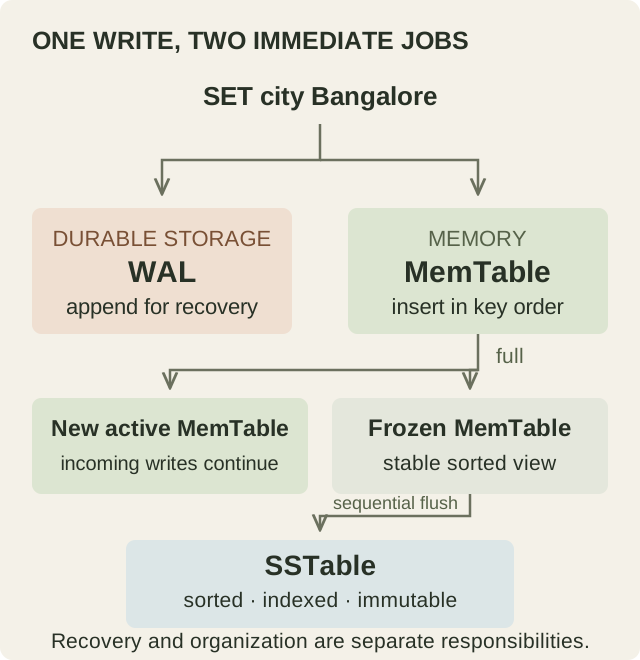
The two logs in our story have different jobs:
- Our first log was the whole database. Reads searched it for values.
- The WAL only protects recent writes in memory.
- SSTables hold the data in a form that is useful for normal reads.
There is one more durability detail. Calling write does not always put bytes on the physical storage device immediately. The operating system may keep them in memory for a short time. To give a stronger durability promise, the database must ask the operating system to flush, or sync, those bytes.
Syncing after every write is safer but slower. Some engines let applications choose the trade-off, while others group several writes into one sync.
After a crash, the database loads its existing SSTables and replays the part of the WAL that had not reached them. This rebuilds the lost MemTable. Once those writes are safely stored in an SSTable, the old part of the WAL is no longer needed.
Congratulations, we accidentally built an LSM tree
We now have:
- new writes kept in sorted order in memory;
- older data stored in sorted files on disk;
- a WAL that protects recent writes;
- a process that moves full MemTables to disk.
This is the basic shape of a log-structured merge tree, or LSM tree.
The main idea is simple: do not reorganize the disk for every small write. Collect writes in memory, write them to disk in a batch, and merge the files later. The original LSM-tree paper describes this broader design. Modern engines differ in many details.
Our write path now looks like this:
- add the write to the WAL;
- add it to the MemTable;
- tell the client that it succeeded once the chosen durability rule is satisfied;
- write full MemTables as SSTables;
- merge SSTables later.
The client does not wait for step five. That is why the write path can be fast. It is also why the database starts collecting multiple files.
Writes are cheap. Reads get the bill.
Ask for one key:
GET user:42
Where is the newest value?
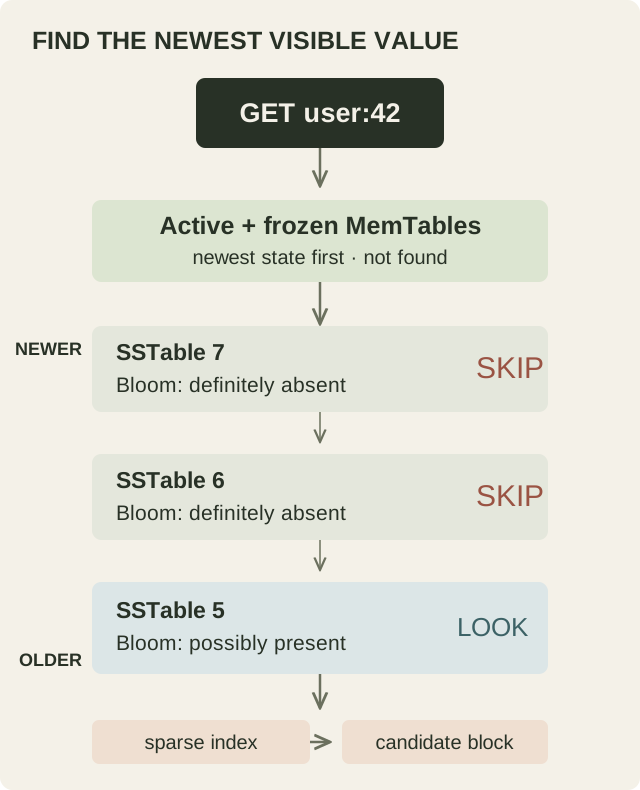
It may be in the current MemTable. It may be in a full MemTable that is waiting to be written. It may be in a new SSTable or an older one. The key may appear in several places with different values.
A read starts with the newest data in memory. If the key is not there, it checks the files on disk. Each SSTable has an index that points to the block where the key should be.
Databases also keep recently read blocks in memory. This is called a block cache. A cached block is faster to read, but the database must still work out which block has the newest value.
Range queries have the same problem on a larger scale. Each file is sorted, but the complete answer may be spread across several files. The database reads them together and ignores older copies of keys.
LSM reads can still be fast. They simply need more help because the newest data is not always in one place.
Before opening a file, ask if it's worth looking
Imagine checking ten SSTables for a key that does not exist. Opening a data block in every file would waste time.
A Bloom filter gives the database a quick test for each SSTable. It can answer:
- definitely not here, so skip this file;
- maybe here, so search this file.
SSTable 1  →  definitely not here  →  skip
SSTable 2  →  definitely not here  →  skip
SSTable 3  →  maybe here           →  search
The filter works with a small row of bits. Adding a key turns on several bits. A lookup checks the same positions. If one of them is off, the key cannot be in the file.
Different keys can turn on the same bits, so “maybe here” can be wrong. This is called a false positive, and it only causes an extra search. A correctly built filter does not say “definitely not here” for a key it contains.
More bits make wrong “maybe” answers less common, but they use more memory. A Bloom filter does not find the value; it only tells the database which files it can skip. LevelDB uses them to reduce the disk reads needed for Get().
Wait... how do you update an immutable file?
Suppose an SSTable contains:
user:42 → "Suryansh"
Now the client sends:
SET user:42 "Suryansh Singh"
The database does not edit the old SSTable. It writes the new value somewhere newer and marks which value came later.
LevelDB and RocksDB use a number that increases with each write. It is called a sequence number:
newer SSTable  user:42 @ sequence 19 → "Suryansh Singh"
older SSTable  user:42 @ sequence 07 → "Suryansh"
A normal read chooses sequence 19 because it is newer.
These numbers can also preserve an older view of the database. For example, a snapshot taken at sequence 12 still sees "Suryansh". Other LSM databases may track order in a different way, but the rule is the same: the newest visible value wins.
An update therefore creates a new version. It does not change the old file.
Deleting something without deleting it
Deletes have a similar problem. Leaving a key out of a new file does not delete it from an older file.
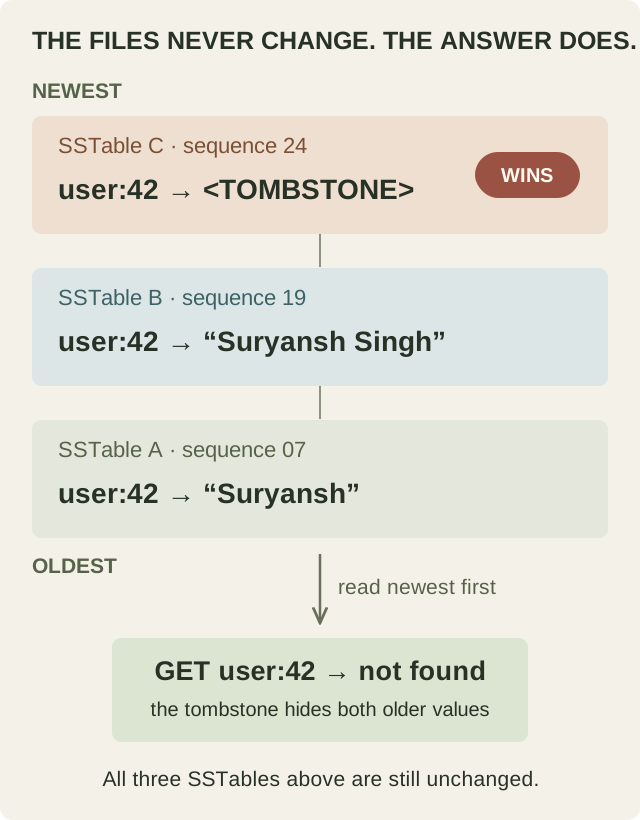
Instead, the database writes a special value called a tombstone:
newer SSTable  user:42 @ sequence 24 → <TOMBSTONE>
older SSTable  user:42 @ sequence 19 → "Suryansh Singh"
The tombstone means, “Ignore any older value for this key.” The record is now deleted for readers, even though both entries still exist on disk.
Why not remove the tombstone immediately?
An older file may still contain the value. If the tombstone disappears first, a future read can find that old value and make the deleted record return.
The database removes a tombstone only when it knows the older value cannot return and no active snapshot still needs it. Cassandra has an extra difficulty: another replica may have missed the delete. Its repair and retention rules must account for that.
Eventually, someone has to clean this up
After many flushes, the disk contains duplicate keys, old values, and tombstones. The database cleans them up through compaction.
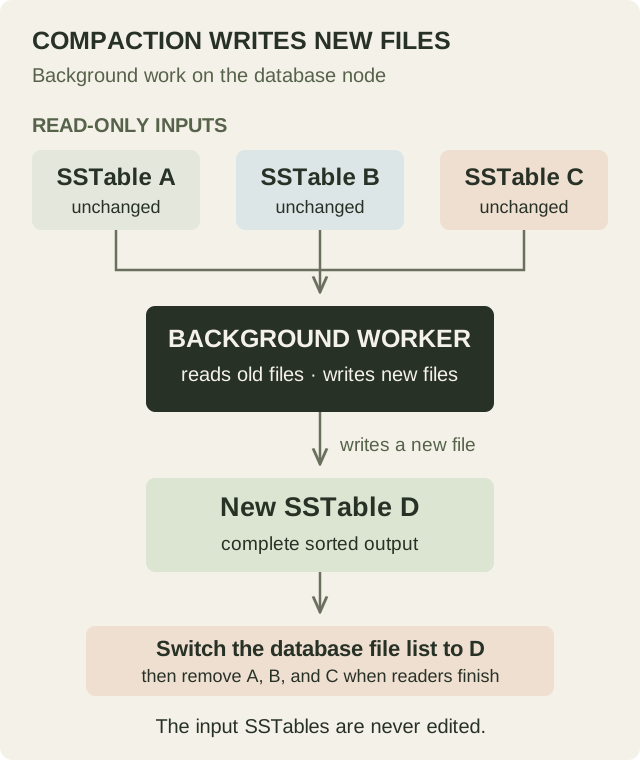
Compaction is background work done by the storage engine. In LevelDB or RocksDB, a background worker compacts files on the same machine as the database. In Cassandra, each node compacts its own local files.
The worker reads old SSTables from disk and writes new SSTables to disk. It keeps the newest values that readers still need. It leaves out old values and tombstones that are safe to remove.
It never opens an existing SSTable and changes its contents. The input files stay untouched during the whole operation.
There are two terms worth separating:
- An SSTable is one file on disk.
- A sorted run is one sorted group of data. A large run may be split into several SSTable files.
Files inside one run cover different key ranges. The bigger read cost comes from having several runs that cover the same keys, because the database may need to check each run.
The replacement happens in steps:
- the background worker reads the old SSTables;
- it writes a complete new set of SSTables;
- the database updates its file list to use the new files;
- the old files are removed after existing readers finish with them.
If the database crashes while writing the new files, the old files are still valid and still appear in the file list. The unfinished output can be ignored or cleaned up during recovery.
The database also needs a rule for deciding when to compact:
- Leveled compaction tries to keep fewer overlapping runs. Reads check fewer places, but compaction rewrites data more often.
- Size-tiered compaction waits for several similarly sized runs and merges them. It does less rewriting, but reads may check more runs and compaction may need more temporary disk space.
These are broad categories, not two exact algorithms. RocksDB, for example, handles its first level differently from later levels.
Compaction must keep up with new writes. If it falls behind, more runs remain on disk, reads become slower, and disk usage grows. Some engines eventually slow down new writes so compaction can catch up. RocksDB calls this a write stall.
Fast writes aren't free
Engineers describe the extra cost with three kinds of amplification.
Write amplification means the storage system writes more data than the application sent. If the application writes 1 KB, the engine may write that data to the WAL, an SSTable, and several compactions. The device might write 5 KB in total. That would be roughly 5× write amplification.
Read amplification means one lookup checks more than one place. A read may check memory, three Bloom filters, two indexes, and one data block before it finds the value.
Space amplification means the database uses more disk space than its current values need. For example, 1 GB of live data may occupy 1.4 GB while old versions and compaction files still exist.
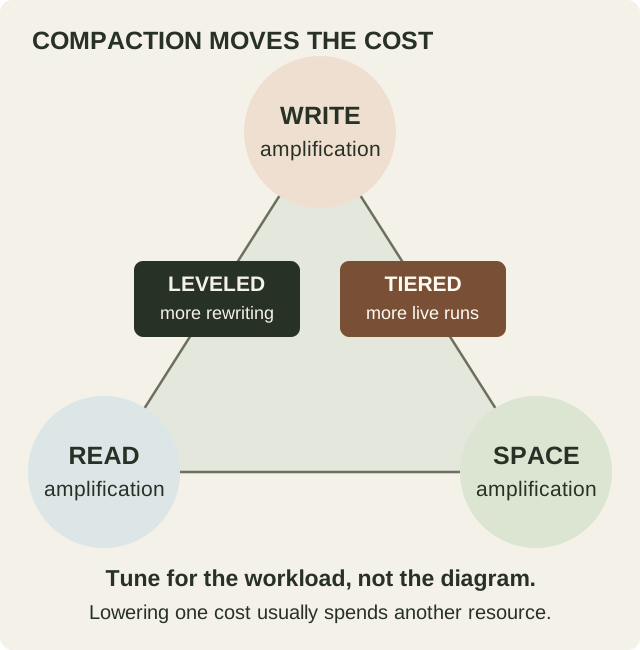
Reducing one cost often increases another. Compact more often and reads check fewer runs, but the engine rewrites more data. Compact less often and writes do less background work, but reads check more runs and old data uses more space.
There is no single best setting. A service that receives constant writes should make different choices from a database that mostly serves reads.
Where you'll actually find this
LevelDB is close to the model we just built. It uses a log, a MemTable, SSTables, and levels of compacted data.
RocksDB builds on that design and adds many choices for memory, caching, file formats, durability, and compaction.
Cassandra uses a similar storage path inside each node. Distribution adds replication, repair, and consistency rules around it.
So why do databases love immutable files?
Writing a new file is often simpler than safely changing an old one while other reads are using it.
New writes go to the WAL and memory. Full MemTables become sorted files. Those files stay stable for readers. Later, compaction creates replacement files and removes old data.
This makes the write a client is waiting for faster, but it creates work elsewhere. Reads may search several places. Updates create versions. Deletes create tombstones. Compaction uses time, disk space, and I/O to clean them up.
LSM trees are not always better than B-trees. Many B-tree databases change pages and protect those changes with a WAL. Some create new page versions instead. The better design depends on what the database reads and writes most often.
We started with a database that changes constantly and files that never change. It works because the database records each change as new data and deals with the old data later.
The old file stays simple. The storage engine takes responsibility for time.
Sources and further reading
- O'Neil et al., The Log-Structured Merge-Tree (1996), for the original architecture and its batching of index changes.
- Chang et al., Bigtable: A Distributed Storage System for Structured Data (2006), for the SSTable definition and a production system built around logs, MemTables, and immutable sorted files.
- LevelDB implementation notes, for a concise description of logs, MemTables, sorted tables, levels, recovery, and manifests.
- RocksDB overview, WAL, and compaction documentation, for the modern embedded-engine details behind the teaching model.
- Apache Cassandra storage engine documentation, for the commit log, MemTable, SSTable, Bloom-filter, and compaction path in a distributed database.
Implementation documentation checked on 15 September 2026. The diagrams are original illustrations created for this article.